
Written for CFOs, Controllers, and Enterprise Partners — by Sam Agosti
Why predictable financials matter more than ever
CFOs don’t fear complexity — they fear surprises.
Surprises in COGS.
Surprises in inventory value.
Surprises in tax.
Surprises at consolidation.
Yet, those surprises don’t come from chance — they come from misaligned financial architecture.
Dynamics 365 Finance can eliminate these surprises completely. But it requires a unified operating model linking:
- Costing policy
- Item model groups
- Cost groups
- Costing versions
- Inventory posting profiles
- Inventory recalculation & close
- Customer–vendor netting
- Sales tax governance
- Consolidation templates
- Excel journal controls
This blog gives CFOs a complete, end‑to‑end blueprint to run finance with zero surprises — tied together through a real‑life scenario and a logical business process flow.
1. Set clean, deliberate valuation policy — Item Model Groups
Inventory valuation begins with item model groups, which decide:
- The costing method (FIFO, LIFO, Weighted Average, Moving Average, Standard).
- Whether physical and financial updates post to the ledger.
- Whether negative inventory is allowed.
- Whether physical value affects cost.
These choices define how costs settle, how COGS is derived, and when GL value becomes final.
CFO takeaway
Item model groups are valuation rules, not technical settings.
Get these right, and you eliminate margin volatility and audit adjustments.
2. Explain costs with confidence — Cost Groups
Cost groups categorize cost into material, labor, machine, and overhead, forming the basis for:
- Detailed manufacturing cost roll‑ups
- Overhead calculation
- Variance explanations
- Multi‑level BOM cost transparency
- Standard cost visibility
In short: cost groups give your finance team the vocabulary to tell the cost story accurately and consistently.
3. Model cost impacts safely — Costing Versions
Costing versions separate simulation from activation.
Planned costing versions
For analysis and forecasting. Use pending costs to simulate:
- Vendor price changes
- Routing updates
- Overhead changes
- Multi‑level BOM impacts
Standard costing versions
For controlled cost activation, with full audit trail and effective dates.
CFO takeaway
You approve cost impacts before they hit the books — not after.
4. Route inventory value properly — Item Groups + Posting Profiles
Finance leaders often assume costing drives ledger behavior — but ledger behavior is actually determined by:
- Item groups (categorize items financially), and
- Inventory posting profiles (map each category to specific GL accounts).
This is where you segment:
- Inventory
- WIP
- COGS
- Purchase price variance
- Production variance
CFO takeaway
Segmented P&Ls, clean balance sheets, and consistent reporting come from this configuration — not from costing policy.
5. Close the period without chaos — Recalculation → Close → Reverse
Month‑end costing discipline follows a specific formula:
Recalculation
Adjust values during the period without settlement.
(Think mid‑month correction.)
Inventory close
Settle transactions, finalize valuation, and lock the period.
Reverse only the latest close
If a back‑dated transaction appears, reverse, post correction, close again.
Never reverse out of sequence.
CFO takeaway
This eliminates post‑close corrections, disputes, and delay.
6. Improve cash by eliminating redundant payments — Customer–Vendor Netting
When a business partner is both a customer and a vendor, netting offsets AR and AP to reduce cash churn.
This requires:
- Netting agreements
- Effective date ranges
- Bridging accounts
- Partial netting
- Automatic netting rules
- Posting date filters
CFO takeaway
This directly improves working capital and reduces banking fees.
7. Make tax consistent and compliant — Sales Tax Governance
Reliable tax reporting requires system‑level consistency:
- Choose whether tax is calculated per line or per document.
- Define rounding precision and method.
- Select calculation origin (net, gross, tax‑on‑tax, per unit).
- Adjust on documents, not via free‑form GL entries.
- Let settlement rounding follow tax authority rules.
CFO takeaway
This prevents tax discrepancies, audit findings, and rework.
8. Close and consolidate faster — Financial Reporting + Consolidation Templates
Detailed Trial Balance
The controller’s single source of truth for reconciliation.
Every number has a drilldown trail.
Consolidation Templates
One‑time setup → monthly execution
Consolidation becomes a button, not a project.
Reporting Trees
Executive views across regions, business units, or entities, in seconds.
CFO takeaway
You get faster, more accurate consolidated financials without manual intervention.
9. Use Excel at scale — but with control
Dynamics 365’s Excel add‑in gives you:
- High‑volume journal editing
- Real‑time synchronization
- Publishing with full validation
- No CSV imports
- No uncontrolled spreadsheets
CFO takeaway
Speed increases while internal controls remain intact.
10. Real-life example: “Acme Devices”
A composite scenario representing a typical multi‑country business:
Business profile
- US parent, EU and Singapore subsidiaries
- Two product lines: Devices (complex), Spares (fast‑moving)
- Multi‑currency and VAT/GST environments
- Standard cost for Devices, moving average for Spares
- Regular customer–vendor netting
- Monthly consolidations
How they operate using this blueprint
Area | Real‑World Execution |
Valuation | FIFO for Devices, Moving Average for Spares; negative inventory disabled. |
Cost Structure | Cost groups classify labor, materials, overhead — enabling variance analysis by cost type. |
Simulation | Planned costing versions evaluate cost increases monthly. |
Activation | Standard cost versions roll forward quarterly, with full audit trail. |
Posting | Item groups route Devices vs. Spares into separate COGS and inventory accounts. |
Period Close | Mid‑month recalculation, Day‑0 close, reverse‑if-needed sequence. |
Netting | Weekly automatic netting with partial offsets. |
Tax | Per‑line VAT calculation, adjustments on documents, authority rounding in settlement. |
Consolidation | Templates allow one‑click consolidation across regions. |
Excel Governance | High‑volume journals via Excel with Refresh → Publish. |
Result
Faster closes, cleaner books, stable COGS, predictable cash flow, smooth audits.
A Visual Overview of the Entire Operating Model
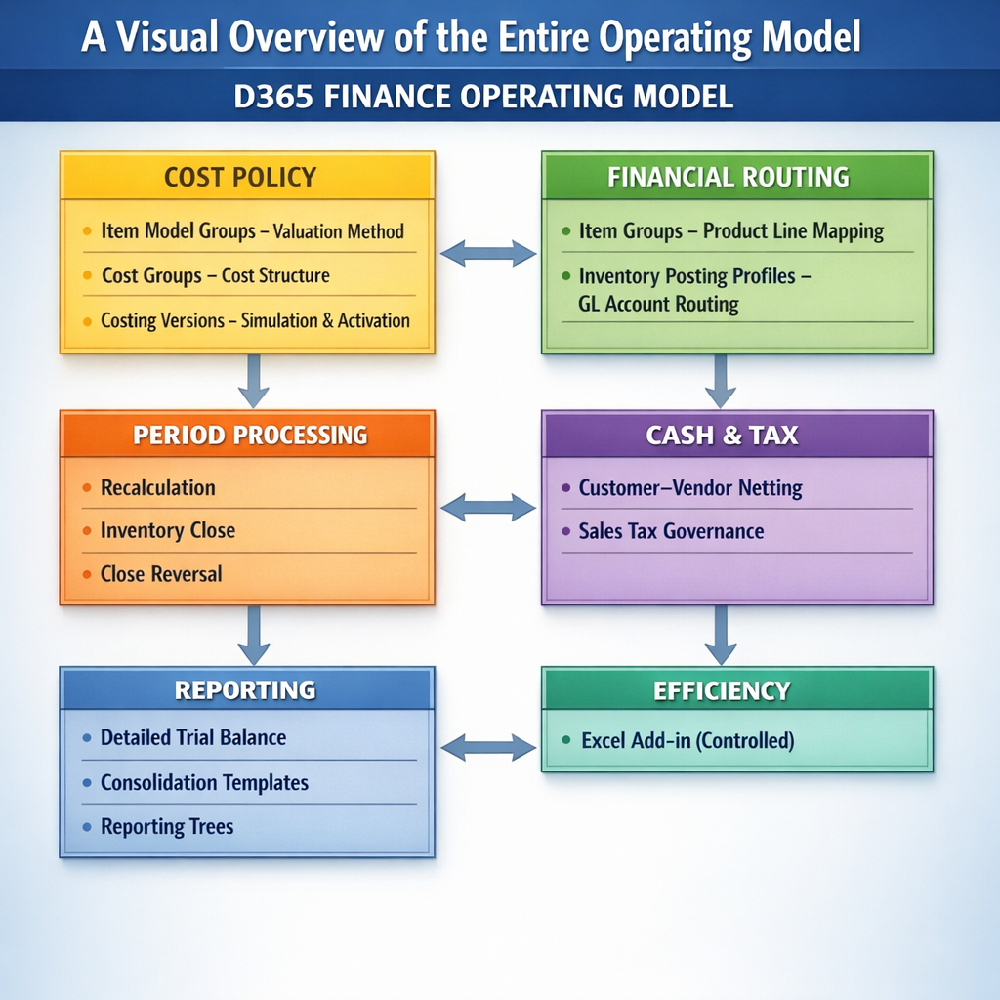
This visual lets CFOs see, at a glance, how everything fits together.
How CFOs Benefit
1. Predictable Month-End Close
No more unexpected adjustments — the sequencing ensures consistent COGS, inventory valuation, and reconciled balances.
2. Audit-Ready Financials
Every number has a traceable source: cost versions → posting profiles → reconciliation trail.
3. Faster Consolidation
One-click consolidation and reporting trees eliminate long manual processes.
4. Cleaner Cash Flow
Netting reduces outgoing payments and bank fees.
5. Fewer Tax Surprises
Consistent calculation rules eliminate rounding errors and audit findings.
6. Better Cost Control
Planned versions let you forecast cost changes months before they hit the P&L.
7. Executive-Grade Transparency
Segmented P&Ls, multi-level BOM visibility, and reporting trees give leadership clarity.
Expected Timeline for Transformation
A realistic, achievable timeline for most organizations:
Week | Activity | Outcome |
1–2 | Diagnostic & architecture review | Identify gaps in valuation, cost flow, posting, netting, tax, consolidation. |
3–5 | Rebuild costing & posting structures | Valuation + GL routing aligned with strategy. |
6–7 | Implement netting, tax governance, Excel controls | Cash efficiency + consistent tax. |
8–9 | Consolidation templates + reporting trees | Faster multi‑entity close. |
10–12 | Dry-run month-end | Predictable, repeatable, audit-ready cycles. |
Most CFOs see measurable improvements by Week 5 and full transformation by Quarter-end.
How Engagement Begins
The engagement follows a clear, structured startup process:
1. CFO Strategic Alignment Call (60 minutes)
We clarify pain points, business model, and desired financial outcomes.
2. Finance Architecture Assessment
We review your:
- Item model groups
- Cost groups
- Costing versions
- Posting profiles
- Netting configuration
- Sales tax parameters
- Close process
- Consolidation structure
3. Blueprint Delivery
You receive a future‑state architecture tailored to your chart of accounts and legal entities.
4. Phased Implementation
Delivered in parallel tracks so controllers can adopt quickly while operations continue normally.
5. Assisted Month‑End
We guide your team through the new model during a live close cycle.
6. Optimization + Automation
Final refinements before full transition to steady-state.
Closing Note
If you want this operating model running in your environment, Contact us to deliver a CFO Executive Briefing, a Controller Month‑End Guide, and a Partner Enablement workshop tailored to your chart of accounts and legal entities.
The outcome: audit‑ready Dynamics 365 Finance with no surprises at close.